
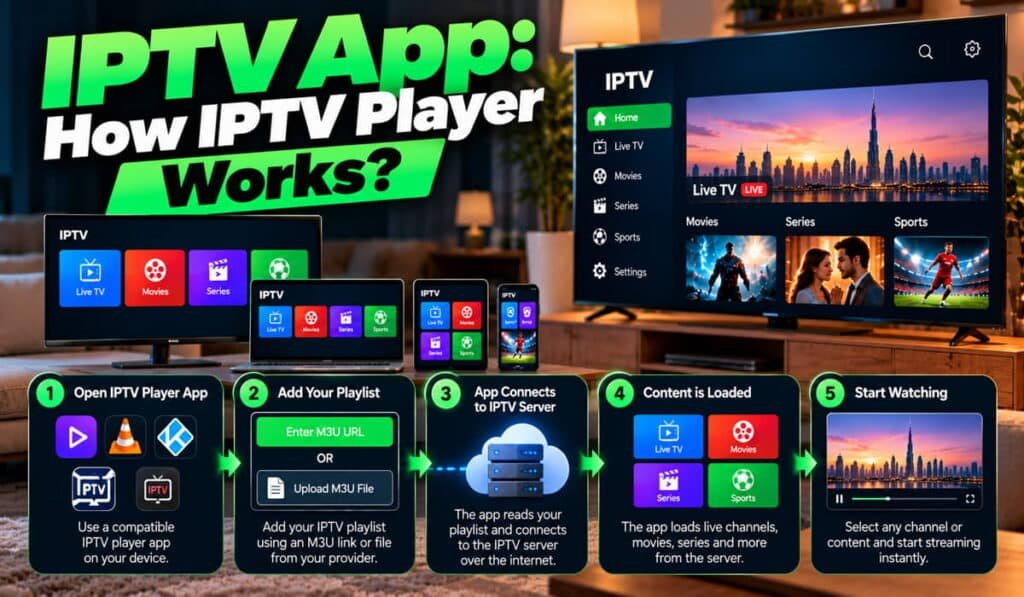
An IPTV app is software that helps you browse and play television channels or video content delivered through an internet-based television service. Depending on the application, you may be able to view channel lists, watch live streams, browse video libraries, check program schedules, save favorites, and control playback from a compatible device.
However, an IPTV app is not necessarily the same as an IPTV service provider. Some apps work as standalone players that require a compatible playlist or service login, while other products combine the application and content service in one offering. Installing a player does not automatically give you access to television channels.
This guide explains how IPTV apps work, the differences between players and subscriptions, important features such as M3U playlists and EPG, supported devices, free and paid options, and how to choose an application that suits your needs. If you are new to IPTV, start with our guide explaining what IPTV is and how it works.
What Is an IPTV App?
An IPTV app is an application designed to access, organize, and play compatible television streams or video content delivered over an Internet Protocol (IP) network. You can think of it as the software interface between the viewer, the available content, and the playback device.
For example, an IPTV app may display a list of live television channels, group them by category, and let you select a channel to watch. Depending on its features and the connected service, it may also provide movies, series, catch-up content, subtitles, and program information.
Some IPTV apps are designed to work with a separate service. Others are linked to a specific platform or offer an integrated content service. Their requirements and features depend on how each product is built.
What Does an IPTV App Do?
A compatible IPTV application may provide several functions:
- Channel navigation: Displays available channels and organizes them into categories.
- Video playback: Opens a selected stream or video using supported playback methods.
- Content browsing: Helps users explore available live television and video libraries.
- Electronic Program Guide (EPG): Shows scheduled programs when compatible guide data is available.
- Favorites and search: Makes frequently watched channels and specific content easier to find.
- Playback controls: May offer pause, resume, seeking, subtitle selection, or audio-track selection.
- Service configuration: Allows users to add a supported account, playlist, or connection method when required.
Not every application provides all these features. Compatibility can also differ between versions of the same app on a television, phone, and streaming device.
What Is the Difference Between an IPTV App and an IPTV Provider?
An IPTV app handles the user interface and supported playback functions. An IPTV service provider supplies access to channels or video content and operates the relevant service infrastructure.
For instance, a standalone player may let you add a compatible playlist from an authorized service. The player displays the available content, while the service determines which streams your account can access.
The two may also be combined in an integrated product. Therefore, check the specific app’s documentation instead of assuming every player works with every provider.
To understand the wider delivery process, read our guide on how IPTV works.
How Does an IPTV App Work?
An IPTV app connects the viewer’s device with the content made available through a compatible service or configuration. Although the technical details vary, the general process follows these steps.
1. Install a Compatible Application
First, choose an app that supports your device and operating system. The available options may differ between Android TV, Fire TV devices, Apple TV, mobile phones, and computers.
Download the application through an official app store or a developer’s verified distribution channel where available. Do not assume that an app compatible with one operating system will work on every device.
2. Connect to a Supported Service
Depending on the application, you may need to sign in, enter service credentials, add a compatible playlist, or complete a provider-specific activation process.
Some players support M3U playlists, while others offer Xtream Codes-compatible login methods or different integrations. These methods are not universal, so follow the instructions supplied by the app and your service provider.
Only use services and content for which you have appropriate authorization. Keep your login details and playlist information private.
3. Load the Available Content
After successful configuration, the app may display channel lists, categories, video libraries, or program schedules. The information it shows depends on the service, playlist, and supported app features.
A channel appearing in the list does not guarantee that its stream is currently available or that the device can play it.
4. Select a Channel or Video
When you choose a channel or video, the application attempts to access the corresponding stream or service endpoint. The process depends on the service’s delivery method and the formats supported by the player.
If the stream is unavailable, the issue could involve the service, account, network, configuration, or application.
5. The Device Plays the Stream
The device processes the incoming media and outputs the video and audio on your screen. Successful playback depends on several factors, including internet connectivity, stream quality, hardware capabilities, media-format compatibility, and the app’s implementation.
What Is the Difference Between an IPTV App, Player, Subscription, and Service?
These terms often appear together, but they describe different parts of the viewing experience.
IPTV App
An IPTV app is software installed on a supported device. It provides the interface for browsing, configuring, or playing compatible content.
IPTV Player
An IPTV player is an application or playback component designed to play supported streams. In everyday usage, the terms IPTV app and IPTV player often refer to the same product.
The exact meaning depends on how the developer describes the software. Some products focus mainly on playback, while others offer additional content organization and account-management features.
IPTV Service Provider
An IPTV service provider supplies access to television channels or video content and manages the relevant service arrangements. The provider may also offer account access, customer support, and service-specific features.
The available channels and content depend on the service and the rights or permissions under which it operates.
IPTV Subscription
An IPTV subscription is an account or plan that grants access to a particular service under its terms. Depending on the product, it may specify the subscription period, supported devices, simultaneous connections, included content, or support arrangements.
A subscription to a content service is separate from a paid license for an IPTV player unless the product explicitly combines them.
Example: You install a standalone player on a compatible television, connect it to an authorized service using a supported method, and browse the content available through that service. The app provides the interface, the service provides access, and the television displays the stream.
Which Features Should You Look for in an IPTV App?
The right IPTV app depends on how you watch television and which features you actually need. Before installing or purchasing one, check the following capabilities.
Device and Operating System Compatibility
Compatibility should be your first consideration. Confirm that the app supports your exact device and operating system, rather than relying only on the application’s name or a general compatibility claim.
For example, an app available on an Android phone may not have a version for Android TV. Likewise, an iPhone app is not automatically available for Apple TV.
Playlist and Service Compatibility
Some IPTV players accept M3U playlists, while others support particular service integrations or login methods. A player may support one configuration method but not another.
M3U is a playlist format that can contain references to media streams and associated information. Its contents and supported features depend on how the playlist is prepared and how the application interprets it.
Xtream Codes-compatible login is another connection method supported by some IPTV applications. Do not assume that every provider or player offers this option.
Before choosing an app, check its official documentation and confirm that it supports the connection method required by your authorized service.
Electronic Program Guide (EPG)
An Electronic Program Guide displays television schedules and program information, such as show titles, timings, and descriptions, when compatible data is available.
EPG support can make live television easier to navigate because viewers can see what is playing and what is scheduled next. However, the app must support the relevant guide format, and suitable data must be available and configured correctly.
An EPG does not supply the video stream itself. It provides program information separately from the content being played.
Learn more in our IPTV EPG guide.
Channel Categories, Favorites, and Search
Large channel lists can become difficult to navigate without useful organization tools.
Channel categories group content into sections, while favorites let users keep frequently watched channels in one place. Search can help locate a channel or video without scrolling through the entire library.
Check whether these functions are available and whether they work with the type of content you plan to watch.
Playback Controls, Subtitles, and Audio
Playback features vary between applications. Some players provide basic play and stop controls, while others may support pausing, resuming, seeking, subtitles, and selecting alternative audio tracks.
The stream and device also matter. An app cannot necessarily provide subtitles or audio tracks that the content source does not include, and some media formats may not be supported by every device.
Parental Controls and Profiles
Some applications include parental controls, PIN protection, or profile-related features. These tools may help families manage access to content.
Check exactly what the controls restrict. A setting might apply only to content organized within the application and may not govern every external service or stream.
Updates, Support, and Reliability
Regular updates can address compatibility issues, bugs, and changes in supported platforms. Clear documentation and accessible technical support are also useful when configuration or playback problems arise.
Popularity, download numbers, and attractive screenshots do not guarantee reliability, security, or compatibility. Evaluate the application’s actual features and maintenance history.
Which Devices Support IPTV Apps?
IPTV apps are available across several device categories, but support depends on the individual application, operating system, hardware, and service requirements.
Smart TVs and Android TV Devices
Some smart TVs provide IPTV applications through their built-in app stores or supported installation methods. Availability varies by manufacturer, model, operating system, and region.
Android TV devices may offer different app options from other smart TV platforms. Check the supported operating systems and installation requirements before choosing a player.
Fire TV Stick and Other Streaming Devices
Streaming devices can provide access to compatible IPTV players, subject to platform restrictions and app availability. Not every application supports every model, and installation methods may differ.
Confirm that the app is available through an appropriate distribution channel and that your device meets its requirements.
Android Phones and Tablets
Mobile IPTV apps may allow users to watch supported content on a phone or tablet. The experience depends on the app, network connection, screen size, and service permissions.
If you watch over mobile data, consider your data allowance as well as streaming quality.
iPhone, iPad, and Apple TV
Apple devices require applications compatible with their respective operating systems. An app available for iPhone or iPad may not have a separate Apple TV version, so check the exact device listed by the developer.
Windows and macOS Computers
Some IPTV players are available as desktop applications. Other services may support a web interface or a different playback method.
Before installing software, verify the developer and the supported operating-system version.
For a more detailed breakdown, visit our guide to IPTV devices and compatibility.
Free vs Paid IPTV Apps: What Is the Difference?
IPTV applications use different pricing models. Some are free, some charge for particular features, and others use a one-time purchase or recurring payment.
Free IPTV Apps
A free app may provide the basic tools needed to configure and play compatible streams. Depending on the product, it may include advertisements, optional upgrades, feature limitations, or limited support.
However, not every free app contains advertisements, and a free price does not automatically make an application unsafe or unreliable.
Paid IPTV Apps
Paid applications may offer additional customization, remove advertisements, or provide other features. The benefits depend on the specific product and its pricing terms.
Paying for a player does not automatically provide access to television channels, a content subscription, or the rights to watch particular programs. If a separate service is required, its charges may be additional.
Free Trials, One-Time Purchases, and Subscriptions
Before paying, identify the type of charge involved:
- Free tier: Basic features are available without an app payment.
- Free trial: Access to certain features is provided for a limited period, subject to the terms.
- One-time purchase: A payment unlocks a product or specified features.
- Recurring subscription: The app charges at regular intervals under its renewal terms.
- In-app purchase: Additional features or access can be purchased within the application.
Check renewal conditions, supported devices, refund policies, and the total cost before committing.
How to Compare Value
Compare the functions you need, device compatibility, update history, privacy practices, support, and total cost. Do not assume a paid app always provides better playback, stronger security, or more content than a free alternative.
The best value is the application that meets your requirements without unnecessary costs or risks.
How to Choose the Right IPTV App
Use these practical steps to narrow down your options instead of relying on an unverified “best IPTV app” ranking.
1. Start With Your Device
Identify your exact television, streaming device, phone, tablet, or computer. Check its operating system and version, then confirm that the app supports it.
2. Check Compatibility With Your Service
Find out which connection methods your authorized IPTV service supports. Compare those requirements with the app’s official documentation.
Do not purchase a player before confirming that it can work with your intended configuration.
3. Prioritize Useful Features
Consider whether you need EPG, channel categories, search, favorites, subtitles, audio selection, parental controls, or particular playback functions.
Avoid paying for features you will not use. At the same time, do not choose an app that lacks a function essential to your viewing habits.
4. Review Security and Privacy
Check who develops the app, where it is distributed, which permissions it requests, and how it handles personal information. Review its privacy policy and update history where available.
On Google Play, the Data safety section provides information declared by developers about their app’s data practices. Review this alongside the permissions and the developer’s own documentation; no single listing detail guarantees that an app is risk-free.
5. Compare Pricing and Support
Confirm whether the price covers the player alone or includes a separate content service. Check whether payments renew automatically and whether the developer provides documentation or customer support.
6. Test Before Committing
If a legitimate free version or trial is available, use it to confirm compatibility on your intended device. Test the features you need before buying an upgrade.
Do not select an app solely because it is heavily promoted or described as the best by an affiliate website. Current compatibility, transparent terms, and your own requirements are more useful decision factors.
How to Set Up an IPTV App
The exact setup process varies between applications and services, but the general sequence is straightforward.
- Check compatibility: Confirm that the application supports your device and operating system.
- Obtain the app safely: Use an official app store or a verified developer distribution channel where available.
- Confirm service access: Make sure you have an authorized service compatible with the player, if one is required.
- Follow the app’s instructions: Use the configuration method documented for that specific application.
- Add the required details: Enter supported account credentials or playlist information only when required.
- Configure available features: Set up EPG or other optional functions if supported.
- Test playback: Check that available channels or videos play correctly and that the controls work as expected.
Do not assume every app uses the same menu names or setup fields. If you encounter a problem, consult the application’s documentation rather than entering information into unfamiliar fields.
Also, keep credentials, passwords, playlist URLs, and access tokens private. These details may allow others to access your account or streams.
For device-specific instructions, follow our IPTV setup guide.
IPTV App Security and Privacy: What Should You Check?
An app’s price and appearance do not establish whether it is safe. Before installing or using an IPTV player, assess its source, permissions, privacy information, and handling of account details.
Download From Trusted Sources
Prefer official app stores or the developer’s verified distribution channel where available. Be cautious with modified app files, unknown installers, and websites that imitate legitimate developers.
A download page should identify the developer and provide clear information about the software.
Review App Permissions
Permissions should make sense for the application’s documented functions. Be cautious if a basic video player requests access to sensitive information or device functions that appear unrelated to its purpose.
On supported Android devices, you can review and change app permissions through the device’s settings.
Protect Login and Playlist Information
Treat service credentials and private playlist URLs as sensitive information. Avoid posting them in public forums, sending them to unknown third parties, or entering them into unofficial tools.
If an app or website asks for credentials, confirm that you are using the intended service and a trusted connection.
Check Privacy and Payment Terms
Read the privacy policy and available data disclosures to understand what information may be collected or shared. Before paying, review the billing terms, renewal schedule, and refund policy.
Understand Content Authorization
A legitimate player can still be used with a service whose content authorization is unclear. Likewise, an application’s availability in an app store does not prove that every stream accessed through it is authorized.
Evaluate the application and the content service separately. Choose services that have the appropriate rights or permissions to provide the content you want to watch.
Common IPTV App Problems and How to Fix Them
An IPTV app problem does not always mean the application itself is faulty. The cause may involve the device, configuration, internet connection, account, stream, or IPTV service provider.
The IPTV App Will Not Open
Check whether your device meets the app’s requirements. Close and reopen the application, restart the device, and check for official software updates.
If the problem continues, consult the developer’s documentation for known compatibility issues.
The App Opens but Channels Do Not Load
Check that your account or playlist details are correct and that the service is available. If only particular channels fail, the issue may be related to stream availability or the provider rather than the app.
Avoid repeatedly changing settings without knowing what they do.
The App Crashes During Playback
Check for app and device updates, close unnecessary applications, and restart the device. If the issue affects only certain streams, media-format compatibility may be a factor.
Clearing an app’s cache may help in some cases, but clearing app data can remove saved settings and configuration. Check the app’s guidance before doing so.
EPG Information Is Missing
If channels play but the program guide is blank or outdated, the guide data may be unavailable, incorrectly configured, or unsupported. EPG problems can occur independently of video playback.
The App Works on One Device but Not Another
Different devices may support different formats, operating systems, hardware capabilities, and app versions. Confirm compatibility for each device rather than assuming that a working setup will behave identically everywhere.
For detailed diagnosis and additional solutions, use our IPTV troubleshooting guide.
Is an IPTV App Legal?
An IPTV app is a software tool, but its existence alone does not determine whether the content accessed through it is authorized. The relevant considerations include the service supplying the content, the rights to distribute that content, and the applicable laws and regulatory requirements.
In the UAE, the UAE Media Council identifies television broadcasting, including IPTV, over-the-top services, and video-on-demand, among the activities covered by media regulation. The legality of a particular app or service should therefore not be inferred from its name, price, or availability alone. <Cite refs={[“turn276367search0″,”turn276367search36”]}/>
Choose services that can establish their authorization to provide the content they offer. For further context, read our guide to IPTV legality in the UAE.
Frequently Asked Questions About IPTV Apps
What Is an IPTV App Used For?
An IPTV app provides an interface for browsing and playing compatible television streams or video content. Depending on the application, it may also offer channel categories, favorites, search, EPG, and playback controls.
Does an IPTV App Include Channels?
Not necessarily. A standalone IPTV player generally does not automatically provide channels. Access depends on whether the application includes an integrated content service or requires a separate compatible service or playlist.
What Is the Difference Between an IPTV App and an IPTV Subscription?
An IPTV app is software used to access or play compatible content. An IPTV subscription is an account or plan that provides access to a service under its terms. Paying for one does not automatically include the other.
Can I Use an IPTV App on a Smart TV?
Yes, if an application compatible with your television’s operating system is available and meets your service requirements. Support varies by TV brand, model, and platform. See our guide to IPTV devices and compatibility.
What Is an M3U Playlist in an IPTV App?
An M3U playlist can contain references to media streams and related information. Some IPTV apps support this format, but compatibility and supported playlist features vary. Use a playlist only when you have appropriate authorization to access its content.
What Is Xtream Codes in an IPTV App?
Xtream Codes commonly refers to a service connection or login method supported by some IPTV applications. It is not universal, so confirm that both your service and selected player support the method.
Does Every IPTV App Support EPG?
No. EPG support depends on the application and its compatibility with the available program-guide data. Even when the feature is supported, the guide may require separate data or configuration.
Are Free IPTV Apps Safe?
Some free applications may be suitable, but price alone does not determine safety. Check the developer, download source, requested permissions, privacy policy, and update history before installing an app.
Do I Need a VPN to Use an IPTV App?
A VPN is not a universal requirement for IPTV apps. Whether one is useful depends on your privacy needs, network policies, and the service’s terms. A VPN does not grant permission to access unauthorized content.
Why Is My IPTV App Not Working?
Possible causes include internet connectivity, incorrect configuration, account access problems, unsupported media formats, outdated software, unavailable streams, or service-side issues.
Choose an IPTV App That Fits Your Needs
The right IPTV app is one that supports your device, works with your authorized service, provides the features you need, and offers clear information about privacy, updates, and pricing.
Before installing a player, confirm its compatibility and connection methods. Understand whether you need a separate content service, and never assume that paying for an app automatically includes channels. By checking these details first, you can make a more informed choice and avoid unnecessary setup problems.