
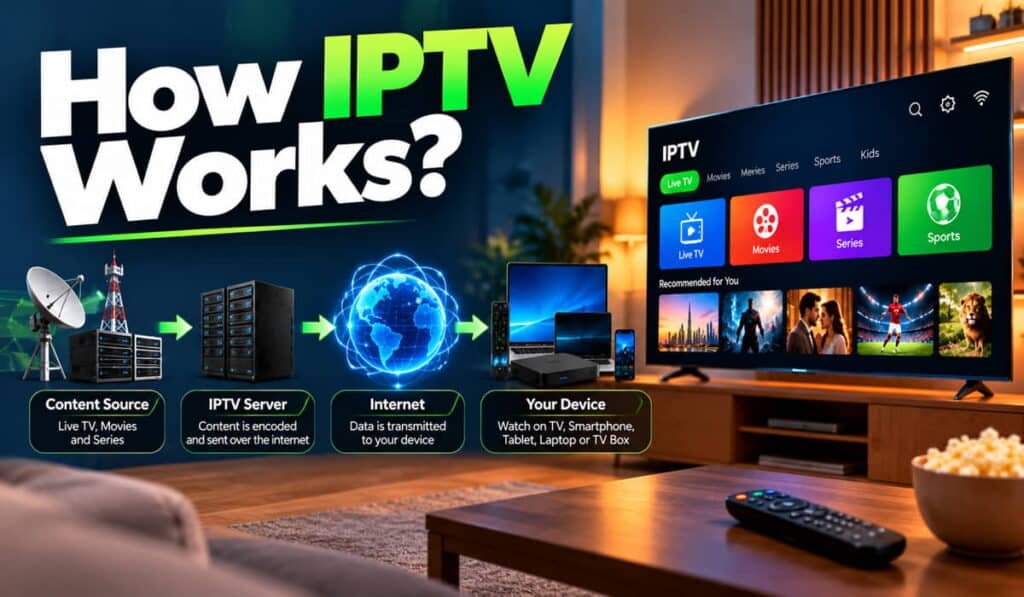
IPTV delivers television channels and video content through Internet Protocol (IP) networks instead of relying solely on traditional cable or satellite distribution. The process starts with a content source, where video and audio are prepared for streaming, distributed through delivery infrastructure, and sent across a network to a compatible app or player. The playback device then decodes the incoming media and displays it on the screen.
The typical delivery path is:
Content source → video preparation → distribution infrastructure → IP network → IPTV app or player → playback device → screen and speakers.
The exact system varies by provider. Some IPTV services use managed networks, while others deliver content over the public internet. Understanding these stages explains how live channels, on-demand videos, and catch-up programmes reach viewers.
What Happens When You Watch IPTV?
When you select a channel or video in an IPTV application, several components work together to deliver the programme.
First, the service makes the requested content available. The video and audio have already been prepared in a format suitable for streaming. The provider’s delivery infrastructure then makes the stream accessible through an IP network.
When you choose a channel, the IPTV app or player uses the available service information to access the appropriate stream. Depending on the system, it may also need to verify your account or subscription. The device receives the media data, decodes it, and produces the picture and sound you see and hear.
Here is the process in simple terms:
- Content becomes available: A broadcaster, production company, content owner, or authorised distributor supplies the programme.
- Media is prepared: Video and audio are encoded and compressed for delivery.
- The stream is distributed: Servers and other delivery components make the prepared media available over an IP network.
- The viewer selects content: The app displays available channels or titles and initiates playback.
- The device plays the stream: Compatible software and hardware decode the incoming media and display it.
Not every IPTV subscription service provider uses the same servers, protocols, or authentication process. However, these stages describe the basic relationship between the original content and the viewer’s screen.
How IPTV Works Step by Step
1. Television Content Is Acquired or Created
Every IPTV stream begins with content. It may come from a television broadcaster, production company, sports rights holder, film studio, content owner, or another authorised source.
For example, a live news programme may originate from a broadcaster’s production studio. A film offered through video on demand may come from a content library supplied by a distributor.
The original content is the programme itself, not the technology that delivers it. IPTV provides a method of distributing video over IP networks, but the technology alone does not establish whether a service has permission to distribute a particular channel, film, or programme.
Before the content can reach viewers, it must be prepared for the delivery system. The required processing depends on whether the source is a live feed, a recorded programme, or an existing video file.
2. Video and Audio Are Prepared for Streaming
Video captured by a camera or received from a broadcaster may not be ready for direct delivery to every viewer. The content usually needs to be encoded into digital media formats that compatible devices can process.
Encoding converts video and audio into a suitable digital representation. Compression reduces the amount of data needed to store or transmit the media.
These processes influence how much data the stream requires and how it appears during playback.
Several factors are connected:
- Resolution: The number of pixels used to represent the picture. Higher resolutions can require more data, depending on how the video is encoded.
- Bitrate: The amount of media data delivered per second. A higher bitrate often supports more visual detail, although the result also depends on the source and encoding quality.
- Compression: The method used to reduce data size. More efficient compression may preserve acceptable picture quality with less data.
- Picture quality: The visible result depends on resolution, bitrate, compression, source quality, and the capabilities of the display.
- Data requirements: The stream’s bitrate affects how much network capacity is needed to maintain playback.
H.264/AVC and H.265/HEVC are examples of video codecs that can be used to encode video. They are not universal requirements for every IPTV service.
The provider must prepare the media in a format that its delivery system and supported playback devices can handle. To explore these technical concepts in more depth, read how IPTV streaming technology works.
3. The Content Is Packaged and Made Available
After encoding, the media must be organised so that the delivery system and playback software can access it.
Some streaming systems divide video into smaller segments. A compatible player can request these segments in sequence rather than downloading an entire programme before playback begins. The system may also provide a manifest or playlist containing information about the available media, segment locations, or different quality options.
For example, HTTP Live Streaming (HLS) can use a playlist that identifies media segments for the player to request. The player reads the playlist, obtains the required media, and presents the content in sequence. HLS supports both live broadcasts and on-demand video. Apple’s HLS documentation explains this process.
MPEG-DASH is another standard for streaming media over existing HTTP infrastructure, including web servers and content delivery networks. It supports live and on-demand streaming. The MPEG standards overview describes its role.
These are examples, not requirements for every IPTV system. Other architectures may package or deliver media differently. The important point is that the prepared content must be made accessible in a form the intended player understands.
4. The Provider Distributes the Stream Over an IP Network
Once the content is ready, the delivery infrastructure makes it available to viewers through an IP network.
An IP network carries data between connected systems using Internet Protocol. In an IPTV environment, the delivery path may involve streaming servers, network routers, caching systems, and other infrastructure. The exact arrangement depends on the provider.
Some services operate through managed IP networks designed for television delivery. Others use the public internet, where the stream travels through the viewer’s internet connection and the networks between the provider and the home.
A provider may also use a Content Delivery Network (CDN). A CDN distributes content through servers or caching locations in different places. This can bring content closer to viewers and improve delivery efficiency, particularly when many people request the same media. Not every IPTV provider uses a CDN, and a CDN cannot eliminate every possible network or playback problem.
The delivery system must make the requested content reachable while providing data at a rate that supports the stream. Network congestion, delivery infrastructure problems, and the viewer’s connection can all affect this process.
5. The IPTV App Requests or Receives the Stream
The IPTV application or player gives the viewer an interface for finding and playing content. It may display channels, programme information, categories, or a video library, depending on the service and software.
When a viewer selects a channel or title, the application uses the available information to initiate playback. It may request a stream address, read a playlist or manifest, select a compatible media option, and retrieve the data needed for playback.
Some services also require the app to authenticate the user or check subscription access before allowing a stream to play.
It is important to distinguish the IPTV service from the IPTV app. The service provides access to content and the associated delivery infrastructure. The app is the software used to browse and play that content.
Some providers offer their own integrated apps. Other users configure an independent player with a supported, authorised service or playlist. The precise setup and available functions depend on the provider and player.
For a closer look at the software’s role, see how IPTV apps work.
6. The Device Decodes and Plays the Video
The final stage happens on the viewer’s playback device. It receives the media data, processes the encoded video and audio, and turns them into the picture and sound that the viewer experiences.
IPTV-compatible playback devices may include:
- Smart TVs that support the relevant application.
- Streaming sticks and compatible streaming boxes.
- Android TV devices.
- Smartphones and tablets.
- Computers.
- IPTV set-top boxes.
The device must support the application’s requirements and the media formats used by the stream. Its operating system, software, processing capabilities, and available codecs can all affect playback.
For example, a stream might reach a device successfully but still fail to play if the application does not support the format or the device cannot decode it correctly. In this situation, the issue may be compatibility rather than internet speed.
The device is therefore more than a screen. It is the part of the system that runs the playback software and processes the incoming media.
Read more about IPTV devices and compatibility.
How Does IPTV Work for Live TV, VOD, and Catch-Up?
IPTV can deliver different types of viewing experiences. The main differences relate to when the content is available and how the viewer selects it. Not every IPTV service includes all three options.
How Live IPTV Works
Live IPTV delivers a live television feed while the programme is being broadcast. The provider receives or produces the feed, prepares it for distribution, and makes it available to viewers through the delivery system.
When a viewer selects the channel, the app accesses the live stream, and the device begins playing the incoming media.
Live playback usually has some delay compared with the original event. Encoding, stream packaging, network delivery, buffering, and player design can all contribute to that delay. The amount varies by service, so IPTV should not be assumed to deliver every event in real time.
How IPTV Video on Demand Works
Video on demand (VOD) lets viewers choose an available film, episode, or other video and watch it when they want.
Instead of joining a live feed, the viewer selects a title from the service’s available library. The system then delivers the requested content for playback.
Depending on the service and player, users may be able to pause, resume, rewind, or move to a particular point in the video. These controls are not guaranteed across every service or title.
How Catch-Up TV Works
Catch-up TV lets viewers watch selected programmes after their original broadcast. The provider must retain or record the relevant content and make it available for later playback.
This differs from live TV, which follows an ongoing broadcast, and from a general VOD library, which may contain films and programmes selected independently of their original broadcast time.
Catch-up availability depends on the provider’s content, retention period, and supported features. A channel appearing in a live list does not automatically mean its past programmes are available.
Explore the related IPTV features and functionality page for more information.
What Is the Role of an IPTV App, Server, and Device?
IPTV works through connected components, but the terms used to describe them refer to different jobs.
IPTV Service and Delivery Infrastructure
The IPTV service manages access to the content it makes available. Depending on its architecture, the infrastructure may include authentication systems, channel information, streaming servers, storage, and content distribution components.
These systems make the selected stream available to the viewer. Their exact design varies between providers, so there is no single server configuration used by all IPTV services.
IPTV App or Player
The app or player provides the interface for selecting content and managing playback. It communicates with the relevant service or stream source and processes the information needed to start the video.
An independent player does not necessarily include television channels or a video library. It may need a compatible configuration and access to an authorised content service.
IPTV-Compatible Device
The playback device runs the app and processes the media. A smart TV, phone, computer, or set-top box may perform this role, provided it supports the relevant software and media formats.
The device and app must work together. A supported device does not automatically guarantee that every IPTV app or stream will be compatible.
Electronic Program Guide (EPG)
An Electronic Program Guide (EPG) displays programme schedules and related information. It can help viewers see what is currently playing, what is scheduled next, or what a channel plans to broadcast.
An EPG provides programme information; it is not the video stream itself. A schedule can appear even when the associated channel is temporarily unavailable or cannot be played.
The EPG’s accuracy and level of detail depend on the information supplied by the service. It does not independently provide channel access or guarantee successful playback.
For more details, read how an IPTV electronic program guide works.
How Does Internet Speed Affect IPTV Playback?
The stream’s bitrate determines how much media data the network needs to deliver each second. The connection must provide enough usable capacity to keep up with playback, while also accounting for other devices and applications using the same network.
However, bandwidth and network stability are not the same thing. A connection may show a high speed-test result but still experience interruptions because of congestion, packet loss, weak Wi-Fi, or inconsistent data delivery. Problems in the provider’s delivery system can also affect playback.
During streaming, the player temporarily collects incoming data in a buffer. This reserve helps playback continue while the next parts of the stream arrive. If incoming data repeatedly falls behind what the player needs, the buffer can run low, and the video may pause while more data arrives.
For this reason, IPTV performance depends on more than the internet package’s advertised speed. The stream’s bitrate, the quality of the local network, the playback device, and the provider’s delivery infrastructure all play a role.
See IPTV internet speed requirements for a dedicated explanation of bandwidth, stream quality, and data use.
Why Does IPTV Sometimes Buffer or Stop Working?
Buffering or playback failure can occur at different points between the content source and the viewer’s screen. Slow or inconsistent network delivery is one possible cause, but it is not the only one.
Common causes include:
- Weak Wi-Fi: A poor wireless signal or interference can interrupt the flow of data to the device.
- Network congestion: Other devices, downloads, or applications may compete for available capacity.
- Unstable connection: Packet loss or inconsistent throughput can disrupt playback even when a speed test looks acceptable.
- App or device compatibility: The player may not support the stream’s format, or the device may struggle to decode it.
- Authentication or configuration problems: An expired session, incorrect settings, or an account access issue may prevent a stream from starting.
- Unavailable content: A particular channel or programme may be temporarily unavailable.
- Provider-side problems: The delivery server or another part of the service infrastructure may be experiencing an issue.
A useful first step is to identify the scope of the problem. If only one channel fails, the cause may differ from a problem affecting every channel or streaming app.
Try this initial diagnostic sequence:
- Test another channel or streaming app.
- Compare Wi-Fi with a wired connection if the device supports one.
- Restart the IPTV app and playback device.
- Check the account status and service configuration.
- Determine whether the issue affects one stream or the entire service.
These checks can help narrow down the cause, but they do not identify every possible fault. For more detailed diagnosis, use the IPTV troubleshooting guide.
How Is IPTV Different From Cable and Satellite TV?
IPTV, cable TV, satellite TV, and OTT streaming can all deliver television or video, but their typical distribution methods differ.
| Delivery method | Typical distribution method |
|---|---|
| IPTV | Television and video delivered using IP networks |
| Cable TV | Television delivered through a cable distribution network |
| Satellite TV | Television delivered through satellites to a receiving dish or terminal |
| OTT streaming | Media delivered over the internet, commonly through apps and online platforms |
Traditional cable television generally uses a cable distribution network to carry channels to subscribers. Satellite television uses satellite signals received through suitable equipment. IPTV delivers content over IP-based networks, which may be managed specifically for television or may use the public internet.
Over-the-top (OTT) streaming commonly describes video services delivered over the public internet outside a traditional managed television distribution system. IPTV and OTT are not always mutually exclusive categories: their technologies and everyday usage can overlap.
These distinctions describe delivery methods, not guaranteed differences in price, picture quality, reliability, or available content. Those factors depend on the particular service, network, equipment, and package.
For the broader explanation of IPTV and its place among television options, see what IPTV is and how it differs from other TV options.
Is IPTV Technology Legal in the UAE?
IPTV is a content delivery technology. Using IP networks to deliver video does not, by itself, establish whether a particular service is lawful.
In the UAE, the regulatory framework covers media activities that include IPTV, over-the-top services, and video on demand. Whether a particular service can lawfully operate and distribute its content depends on the applicable requirements, relevant permissions, and content rights. The UAE Media Council identifies IPTV, OTT, and VOD among regulated media activities in its official FAQ.
Do not assume that every IPTV service is legal or illegal based on its technology alone. For a fuller explanation of the relevant considerations, see IPTV legality in the UAE.
Frequently Asked Questions About How IPTV Works
Does IPTV Work Through the Internet?
IPTV uses Internet Protocol networks to deliver video and television content. However, not every IPTV deployment relies on the public internet. Some services use managed IP networks designed for television distribution, while others deliver streams through a household’s regular internet connection.
Does IPTV Need a Satellite Dish or Cable Connection?
IPTV generally does not need a satellite dish or a traditional cable-TV feed to deliver its video. It needs suitable IP network access and a compatible playback device. The exact connection and equipment requirements depend on the service and its delivery architecture.
Does an IPTV App Provide the Channels?
Not necessarily. An IPTV app provides software for browsing and playing content, but it may not include channels or a video library by itself. Depending on the setup, the app may require an authorised account or a compatible service configuration to access streams.
Can IPTV Work on a Smart TV?
Yes, if the television and service are compatible. The TV needs a supported application or playback method, along with the capabilities required to decode the stream. Compatibility depends on the TV’s operating system, available software, hardware, and the media formats used.
Why Does IPTV Buffer Even With Fast Internet?
A high speed-test result does not guarantee uninterrupted playback. Weak Wi-Fi, congestion, packet loss, device limitations, application configuration, or provider-side delivery problems can all cause buffering. The cause depends on where the delivery process is failing.
Does IPTV Use Data?
Yes. Streaming transfers video and audio data across an IP network. The amount consumed depends on the stream’s bitrate, how long you watch, and the quality of the media. Higher-bitrate streams generally transfer more data over the same viewing period.
What Is the Difference Between IPTV and OTT?
IPTV generally describes television delivered through IP-based networks, which may include managed networks or the public internet. OTT commonly refers to media delivered over the public internet through online platforms and apps, outside a traditional managed television distribution system. The terms can overlap in practice, so the exact meaning depends on the service and context.
Final Thoughts
IPTV works by connecting several stages of content delivery. A content source supplies the programme, encoding and compression prepare the media, distribution infrastructure makes it available over an IP network, and an application accesses the selected stream. A compatible device then decodes the incoming data and displays the video and audio.
The viewer’s experience depends on how these components work together. The app must be able to access the stream, the device must support the media format, and the network must deliver data consistently enough for playback. Live TV, video on demand, and catch-up TV use the same broad delivery concept but offer different ways to access content.
Understanding this process makes it easier to distinguish an internet connection problem from an app, device, or service issue—and to know which part of IPTV to investigate when playback does not work as expected.