
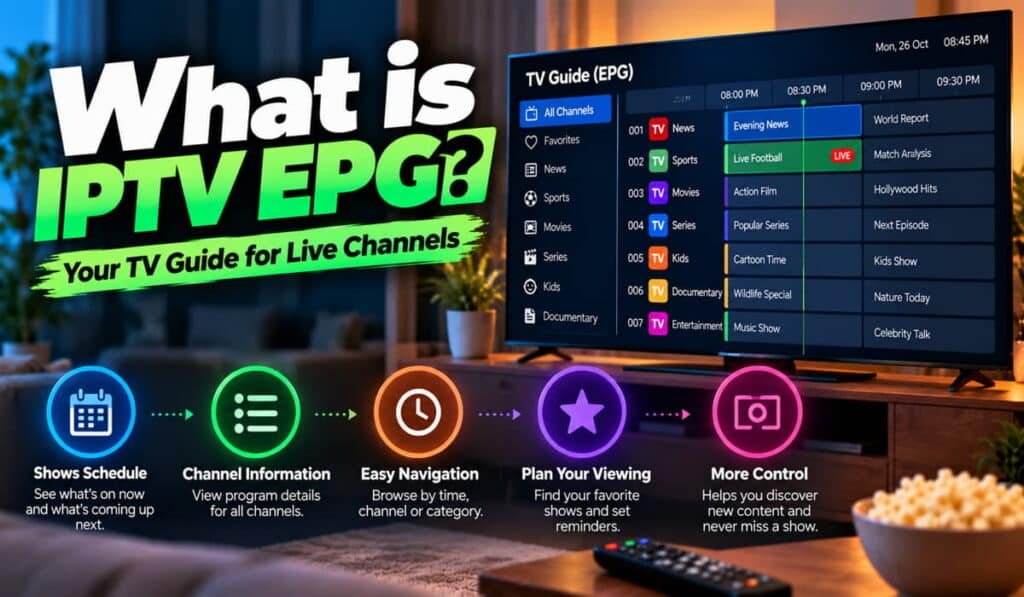
IPTV EPG stands for Internet Protocol Television Electronic Programme Guide. It is the digital TV guide that shows programme schedules, channel names, current shows, upcoming programmes, and other available information in an IPTV application. It helps viewers see what is playing and what is scheduled next without opening every channel individually.
An EPG works by using programme information supplied by a service or a compatible guide-data source. The IPTV application then displays that information and matches it with the relevant channels. The exact process depends on the service and app being used.
One important point is that an EPG displays programme information; it does not deliver the video stream itself. A guide can be empty even when channels are working, and a populated guide does not guarantee that every channel will play.
If you are new to IPTV, start with our guide explaining what IPTV is and how it works.
What Is IPTV EPG?
An Electronic Programme Guide, commonly called EPG, is an on-screen schedule of television programming. In an IPTV system, it helps viewers browse available channels and see information about the programmes associated with them.
Depending on the available data and the application’s features, an IPTV EPG may display:
- Channel names or channel numbers.
- The title of the current programme.
- Upcoming programme titles.
- Programme start and end times.
- Short programme descriptions.
- Additional information about selected programmes.
For example, you might open the guide and see that a sports programme is currently scheduled on one channel, followed by a news programme at a particular time. You can browse the schedule before deciding what to watch.
The information displayed depends on the guide-data source. Some listings include detailed descriptions, while others provide only programme titles and times.
An IPTV application must support EPG functionality and have access to compatible guide information for these listings to appear. Not every IPTV service includes an EPG, and different applications may handle programme information differently.
Why Is an EPG Useful?
Without a guide, you may need to open channels individually to find something to watch. An EPG makes this process easier by bringing available programme information into one interface.
It can help you:
- Check what is currently scheduled.
- See which programme is coming next.
- Browse channel schedules.
- Read programme descriptions when available.
- Find suitable content more easily.
Some applications provide additional navigation features, such as searching or selecting programmes from the guide. However, recording, reminders, and catch-up playback are separate features that depend on the app and service.
How Does an IPTV EPG Work?
An IPTV EPG works by combining programme schedule data with the channel information used by an IPTV application. Although the technical implementation varies, the general process follows five steps.
1. A Source Provides Programme Information
The EPG begins with data describing television programmes and their schedules. This information may come from the IPTV service, a configured guide source, or another arrangement supported by the application.
The data can include programme titles, descriptions, channel identifiers, and scheduled start and end times.
The source of this information may be different from the source delivering the actual video streams.
2. The Application Retrieves or Reads the Guide Data
The IPTV application must be able to access and interpret the available programme information.
Some apps receive guide data through an integrated service. Others allow users to configure a compatible guide source or import supported data.
The exact method depends on the application’s design. Some apps update programme information automatically, while others provide a manual refresh option.
3. The Application Matches Guide Data to Channels
The application needs to associate the programme records with the correct channels.
For example, if the guide contains a schedule for a particular sports channel, the application must identify which channel in the user’s IPTV list corresponds to that schedule.
Channel identifiers may be used for this matching. If the identifiers do not correspond correctly, the guide might remain empty or display programmes against the wrong channels.
4. The EPG Displays the Schedule
Once the data has been interpreted and matched, the application displays the available programme information in its guide interface.
The viewer can browse channels, check current listings, and look at upcoming programmes. Available navigation options depend on the app.
5. The Guide Updates When New Data Is Available
Programme schedules change, so the EPG may need to refresh its data. Some applications update automatically, while others require the user to select an update or reload option.
An update can only display the information available from the source. If the source is outdated or incomplete, refreshing the guide may not correct the underlying problem.
To understand the wider delivery process, read our guide on how IPTV works.
What Information Does an IPTV EPG Show?
The information available in an EPG depends on the data source, the channel, and the application.
Current and Upcoming Programmes
One of the main purposes of an EPG is to show what is currently scheduled and what comes next.
For example, the guide may display a current programme with its scheduled end time and list the next programme underneath it. This allows you to browse the schedule before switching channels.
However, listings are not always perfectly accurate. A broadcaster may change its schedule, or the guide source may not update immediately. The EPG reflects the data available to the application, not necessarily every real-time change.
Programme Descriptions and Schedule Times
Some EPG listings include a short description explaining the programme’s subject or content. Others show only a title and schedule.
The guide may also display programme start and end times. These times need to be interpreted correctly according to the data source and application settings.
If programmes consistently appear one or more hours earlier or later than expected, the issue may involve time-zone settings, the way the app interprets schedule times, or inaccurate source data. It is not always caused by the device clock.
Channel Browsing and Guide Navigation
An EPG can make large channel lists easier to navigate. Depending on the application, users may be able to move between channels, view scheduled programmes, or select a listing to open the corresponding channel.
Some apps also offer guide search or additional navigation features, but these are not universal.
For a broader explanation of the functions available in IPTV applications, read our guide to IPTV features.
What Is XMLTV in IPTV EPG?
XMLTV is a commonly used XML-based format for sharing television programme listings. Compatible IPTV applications can use XMLTV data to populate an electronic programme guide.
The data may contain programme titles, descriptions, schedule times, and identifiers that help associate programmes with channels.
XMLTV is a format for programme information, not a video-streaming protocol. It does not deliver the television programme itself.
What Is an XMLTV EPG URL?
An XMLTV EPG URL is an address that an application can use to retrieve compatible programme-guide data.
Some IPTV applications let users enter a guide-source address in their settings. The app then attempts to retrieve the programme information available at that address.
However, a URL is not automatically valid or compatible simply because it looks like an EPG address. The source must be accessible, the data must use a supported format, and the information must match the channels the application is displaying.
Follow the instructions supplied by your IPTV service or application. Avoid using arbitrary third-party EPG URLs without checking their reliability, compatibility, and authorization.
Do not confuse an EPG URL with an IPTV playlist URL. They may point to different resources and serve different purposes.
What Is the Difference Between EPG Data and an M3U Playlist?
An M3U playlist and EPG data serve related but different functions.
| Feature | M3U playlist | EPG data |
|---|---|---|
| Main purpose | Lists channels or media references | Provides programme schedules |
| Typical information | Stream references and possible channel metadata | Programme titles, descriptions, and times |
| Role in IPTV | Helps the app identify available streams or entries | Helps the app display television listings |
| Video playback | May contain references used to access streams | Does not deliver the video itself |
| Channel matching | May contain channel identifiers or names | May contain corresponding identifiers and programme records |
A compatible IPTV app may use both sources. The playlist identifies the available channel entries, while the EPG provides programme information that can be matched to them.
The precise fields and configuration requirements vary by application and provider. Some services supply guide data automatically, so users may not need to enter a separate EPG URL.
For more information about applications and configuration methods, see what an IPTV app does and our IPTV setup guide.
How to Set Up IPTV EPG
The exact setup process depends on your IPTV application, device, and service. Some apps load programme information automatically, while others require users to select or configure a guide source.
Use the following general steps.
Step 1: Check Whether Your IPTV Service Provides EPG
First, check the service’s documentation or the application’s setup instructions.
Some services supply programme information as part of their normal configuration. Others may require a separate guide source or a supported configuration method.
Do not assume that every IPTV service includes an EPG. If the feature is available but not working, confirm how the service expects it to be configured.
If you are in Dubai or anywhere in the UAE, you can choose IPTV Dubai, which offers EPG with its IPTV services.
Step 2: Open the Programme Guide Settings
Look for the relevant guide or programme-information settings in your IPTV application.
Depending on the app, the feature may be labelled EPG, TV Guide, Programme Guide, Guide Source, or something similar.
The exact menu location varies. Use the application’s official instructions rather than following menu paths intended for a different player.
Step 3: Add or Select the Guide Source
If your app requires a separate source, follow the service’s documented instructions for adding it.
Some applications accept an EPG URL or a compatible file. Others use integrated settings or service-specific account configuration.
Make sure the source is compatible with the app and provides information for the channels you use. An IPTV playlist and an EPG source are not interchangeable unless the application specifically supports the relevant configuration.
Step 4: Refresh the Programme Data
If the application provides a refresh, update, or reload option, use the documented process to retrieve the latest available listings.
Allow the process to finish before deciding whether the guide has loaded correctly. Depending on the application and source, updating the programme data may take some time.
Step 5: Check Channel Matching and Schedule Times
Open a few channels and check whether their programme titles and times appear correctly.
If the guide is empty, the source may be unavailable, unsupported, or incorrectly configured. If the guide shows programmes for the wrong channels, the channel-matching information may need attention.
If the times are consistently wrong, check the device’s date, time, and time-zone settings and consult the application’s instructions for interpreting guide times.
Why Is My IPTV EPG Not Working?
If your IPTV EPG is missing or incorrect, first check whether the problem affects only the programme guide or also affects channel playback.
A missing guide does not necessarily mean that the video stream is unavailable. The EPG and the stream perform different functions, so they can experience separate problems.
EPG Is Empty or Programme Information Is Missing
An empty EPG may have several causes:
- The service does not provide programme-guide data.
- The guide source is unavailable or cannot be accessed.
- The data has not refreshed successfully.
- The channel identifiers do not match.
- The application does not support the configured format.
Start by checking the service’s instructions and confirming that the guide source is configured correctly. If your app offers a refresh option, follow its documented update process.
If the guide remains empty, check whether the source is available and whether the application supports its format. Avoid repeatedly refreshing without investigating the underlying issue.
EPG Shows the Wrong Programmes
If programme information appears against the wrong channel, the problem may involve channel matching.
For example, the guide may contain the correct schedule for one channel but associate it with another channel in the application. This can happen when the channel identifiers or mapping information do not correspond correctly.
Where the app exposes channel-matching settings, check that the correct guide record is associated with each channel. If the application manages matching automatically, consult its documentation or contact the service provider.
Refreshing the guide repeatedly may not resolve an incorrect channel mapping.
IPTV EPG Times Are Incorrect
Incorrect schedule times can result from several issues:
- The device’s time-zone settings are incorrect.
- The application interprets schedule times differently from the source.
- The guide data contains inaccurate or outdated times.
- The source and application handle time information differently.
First, check the device’s date, time, and time zone settings. Then review the IPTV app’s guidance on programme times.
If the device settings are correct but the guide remains inaccurate, the problem may lie in the guide data itself. Contact the service or application support team if you cannot identify the cause.
EPG Will Not Update
If your guide does not refresh, the source may be unavailable, the network may be preventing access, or the application may not have completed the update process.
Try the app’s documented refresh method and confirm that the guide source is still valid. If the service provides status information or support documentation, check whether there is a known issue.
A refresh can only retrieve data that is available from the source. It cannot correct missing or inaccurate programme information at the source itself.
EPG Works on One Device but Not Another
If the guide works on one device but not another, compare the applications and their settings.
The two devices may use different app versions, support different data formats, or handle guide updates differently. They may also be configured with different sources.
Check whether both apps are using the intended guide configuration and whether each supports the available format. Do not assume that a working guide on one device guarantees identical behaviour on another.
For further help with app and playback issues, see our IPTV troubleshooting guide.
If the problem appears to involve access to the guide source rather than channel matching or programme data, our IPTV internet speed requirements guide may help you assess the network connection. Higher internet speed, however, will not normally fix incorrect channel identifiers or inaccurate schedule data.
Can IPTV Work Without an EPG?
Yes. An IPTV service or application can often play channels without displaying an electronic programme guide, provided the streams and other required settings are working.
The EPG is a guide feature, not the video itself. If programme information is unavailable, the application may still be able to access and play a channel.
Without an EPG, you may lose convenient access to:
- Current programme titles.
- Upcoming programme schedules.
- Programme descriptions.
- Guide-based channel browsing.
The exact experience depends on the application. Some players may display basic channel information from another source, while others may show only channel names or numbers.
Whether the guide is optional also depends on the service and application. The important point is that an EPG problem and a video-playback problem are not necessarily the same issue.
If you can watch channels but cannot see programme information, focus on the guide source, data refresh, and channel matching before changing unrelated playback settings.
What Is the Difference Between EPG, Live TV, Catch-Up TV, and VOD?
EPG, live television, catch-up TV, and video on demand are related IPTV concepts, but each serves a different purpose.
| Feature | Main purpose | What it provides |
|---|---|---|
| EPG | Programme discovery | Television schedules and programme information |
| Live TV | Real-time viewing | A live channel stream or programme |
| Catch-up TV | Watching eligible past programmes | Access to selected earlier content, where offered |
| VOD | On-demand viewing | A library of content viewers can select and play |
An EPG may show that a programme is scheduled at a particular time, but this does not mean the app can record it or play it later.
Catch-up TV requires a separate service feature and access to the relevant past content. Its availability depends on the service, the programme, and applicable content rights.
VOD works differently because viewers select available titles from a content library instead of relying only on a live channel schedule.
An IPTV application may display EPG data alongside live channels and other content, but the availability of these features depends on the service and player.
Frequently Asked Questions About IPTV EPG
What does EPG stand for in IPTV?
EPG stands for Electronic Programme Guide. It displays programme schedules and related information for supported television channels.
Is an EPG the same as an IPTV playlist?
No. An IPTV playlist commonly contains channel or media references, while an EPG provides programme listings and schedule information. A compatible app can match the guide data to the relevant channels.
What is an XMLTV EPG?
XMLTV is a commonly used XML-based format for television programme information. Compatible applications can use XMLTV data to populate an electronic programme guide.
Why does my IPTV EPG show no information?
Possible causes include missing guide data, an inaccessible source, a failed update, unsupported formats, or unmatched channel identifiers. Check the service’s instructions and the application’s configuration before changing other settings.
Why are IPTV EPG times wrong?
Incorrect times may result from time-zone settings, the way the application interprets schedule times, or inaccurate programme data. Check the device settings and then investigate the guide source if the problem continues.
Does every IPTV service include an EPG?
No. EPG availability depends on the service, the information it supplies, and the application being used. Some services provide guide data automatically, while others may not include it.
Can I use IPTV without EPG?
Often, yes. Channels may continue to play even when programme listings are unavailable, provided the stream and other required configuration are working.
Does EPG provide catch-up TV?
No. EPG provides programme information. Catch-up TV requires a separate feature that allows viewers to access eligible past content.
Use IPTV EPG to Navigate Programme Schedules
An IPTV EPG makes television easier to navigate by displaying channel schedules, current programmes, upcoming listings, and other available information. Its usefulness depends on the quality of the guide data, correct channel matching, and compatibility with the IPTV application.
If the guide is missing or incorrect, first identify whether the issue affects programme information alone or also affects video playback. Then check the guide source, refresh process, channel mapping, and time-zone settings as appropriate.
Understanding the difference between an EPG, an IPTV playlist, and a video stream makes setup and troubleshooting much easier. Once these components are configured correctly, the guide can help you find programmes without manually opening every channel.